> For the complete documentation index, see [llms.txt](https://help.besmart.software/t4r/llms.txt). Markdown versions of documentation pages are available by appending `.md` to page URLs; this page is available as [Markdown](https://help.besmart.software/t4r/features/list-of-features/duplicate-views.md).
# Duplicate Views
Duplicates selected views (floor plans, sections, 3D, views, etc.) in the current project.
**Icon:**
**Location:** ribbon Be.Smart T4R, panel Views
**Packages:** Be.Smart T4R Bronze | Be.Smart T4R Silver
{% hint style="info" %}
### Main functionalities and benefits:
* Better organize and filter views
* Easier access to all views in your project
{% endhint %}
### **Overview**
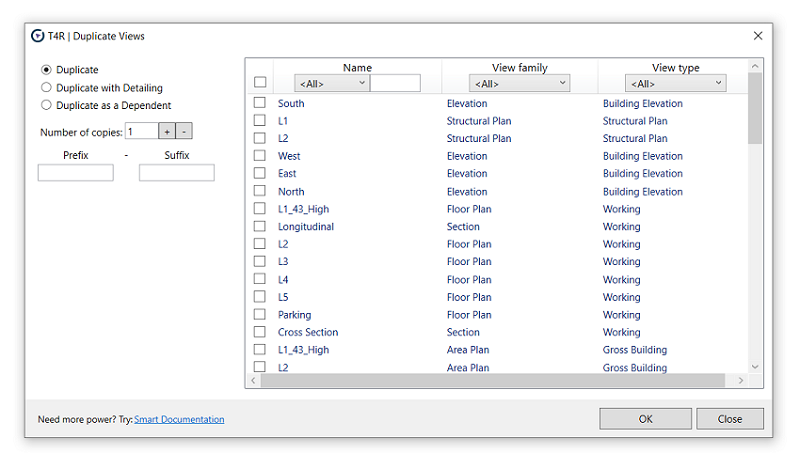
The function Duplicate Views allows bulk duplicate selected views from the current project. You can filter by view name, type, or view family name.
When creating new views, you can add your own **prefix / suffix** and define the number of copies. The tool can also easily filter the list of existing views from the project -by name, type and view typ
#### Click to play the video tutorial ↓
{% file src="/files/ES34HyCq64bHw4oPL3QI" %}