> For the complete documentation index, see [llms.txt](https://help.besmart.software/older-26.0.0/llms.txt). Markdown versions of documentation pages are available by appending `.md` to page URLs; this page is available as [Markdown](https://help.besmart.software/older-26.0.0/commands-overview/bom/copy.md).
# Copy
## Command Description
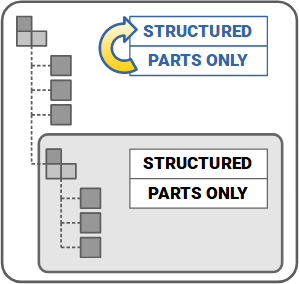
The Copy command copies the item numbers of the *Parts Only* BOM view of the current (main) assembly to the *Structured* BOM view of the current assembly. To avoid any duplicate numbers, the numbering of components in the structured BOM view then continues where the parts-only item numbering left off.
{% hint style="info" %}
This command acts on the current active assembly only.
{% endhint %}
{% hint style="warning" %}
This command is to be run in the main assembly only.
{% endhint %}
A schematic image of the process is in the image below.
Copy command workflow
### Summary of changes to the BOM performed by the command (a comparison matrix)
The comparison matrix of BOM manipulation tools
## Command Location
* Assembly environment (`Holixa T4I -> BOM panel`, `Assemble -> Manage panel`).
## Command Settings
This command has no settings.
## Workflow Overview
1. Run the command.
## Description of changes performed by the command
In *Parts Only* BOM, components 004, 005, and 006 have item numbers 4, 5, and 6. Because they are part of the subassembly 010 that has the item number (in *Structured* BOM) of 7, their item numbers in structured BOM view are 7.1, 7.2, and 7.3.
| Structured BOM before applying the command | Parts Only BOM before applying the command | Structured BOM after applying the command |
| ---------------------------------------------------------------------------------------------------------------------------------------------------------------------------------------------------------------------------------- | --------------------------------------------------------------------------------------------------------------------------------------------------------------------------------------------------------------------------------- | ----------------------------------------------------------------------------------------------------------------------------------------------------------------------------------------------------------------- |
|  |  |  |
After running the command, structured numbering (behind the dot symbol) matches the parts-only numbering. The numbering then continues where the parts-only numbering is left off, and appends the next higher number (10 in this case) to the subassembly item number, thus forming the final structured numbering of subassembly components (10.x).